Mini Apps
Working with Telegram API in Mini Apps: Complete Guide
Your complete guide to working with Telegram Mini Apps. Learn how to build your own Mini App for the Telegram platform and integrate the API effectively.
Contents
Getting StartedWorking with User DataAdvanced UI ComponentsHandling PaymentsImplementing NavigationBest Practices and Advanced TipsTesting and DebuggingConclusionMini App growth works best when the ad moment stays inside Telegram context.
Pair acquisition with tracking and a clear return path.
Use related guides to connect setup, API, and promotion decisions.
Getting Started
Hey there, tech enthusiast! Are you ready to embark on a thrilling journey into the world of Telegram Mini Apps ? Whether you’re a seasoned developer or just getting your feet wet, this guide is your passport to mastering these dynamic applications. We’ll cover everything from setting up the basics to unleashing advanced features, peppered with practical examples and insider tips.
A mini app is a small web application that runs inside Telegram, launched through a Telegram bot. These apps allow users to interact with various services without ever leaving the Telegram app. By leveraging the Bot API and built-in web app support, a mini app provides smooth integration and fast performance.
When a Telegram bot launches a mini app, it can process a query sent from a specific chat and use that data to deliver a personalized experience through the mini app interface. Accessing the mini app may require authentication, verifying the user’s username and generating a unique token.
In this way, Telegram mini apps enable seamless and fast interactions—from booking a ride to playing games—directly within Telegram, creating an intuitive and user-friendly experience.
Working with User Data
Before you start coding your Telegram Mini App—whether it’s running as an app or on the main screen—make sure you’re equipped with the right tools:
Development Tools: Use a powerful text editor or IDE with JavaScript support to build responsive mini apps opened within the Telegram UI.
Local Server: Set up a secure HTTPS server to test how your mini app is expanded and behaves within the visible area of the mini app.
Browser Dev Tools: Essential for debugging and observing how your app reacts in response to user interaction, especially when the mini app will be closed or reloaded depending on the chat from which the mini app was opened or the version of Telegram used.
Advanced UI Components
Testing thoroughly in different contexts ensures your area of the mini app functions smoothly across use cases.
Creating an engaging Mini App isn’t just about functionality—it’s also about aesthetics and user experience:
Visual Integration : Aim for harmony with Telegram’s sleek design language.
Responsive Design : Ensure your app looks great on any device.
Handling Payments
Error Handling & Offline Support : Prepare for every scenario so users always have a smooth experience.
Loading Speed : Optimize initial load times using techniques like progressive loading and caching resources efficiently.
Runtime Performance : Manage memory effectively, ensure animations are fluid, interfaces are responsive, and operations don’t drain battery life excessively.
Boost your user interaction with the mini by building a mini app using rich features like keyboard button mini apps, which are launched right inside Telegram. The telegram client automatically inserts the bot’s username and handles the specified inline query. The current mini can access orientation data, including attitude relative to magnetic north, through the app URL and communicate securely with the bot.
Implementing Navigation
Let’s learn from others’ mistakes so you can steer clear of trouble spots:
Performance issues? Address them before they become headaches.
Design missteps often include confusing navigation or inconsistent styles—stay vigilant here!
The tech landscape keeps evolving, and now is a great time to build a Telegram mini app that stands out. New features enhance interaction with the mini app, letting users click inside the mini app and trigger powerful actions. When users open the mini app within the Telegram interface—whether it’s the main mini app or used via inline mode mini apps—the bot’s username will be inserted automatically.
Best Practices and Advanced Tips
When launched, Telegram locks the mini app’s orientation, and the platform can determine the device’s attitude relative to magnetic north. This data is returned only for mini apps. Telegram also processes the chat and inserts the bot’s details, including the bot’s username and the specified query. With these tools, bot mini apps become more dynamic and deeply integrated into the user experience.
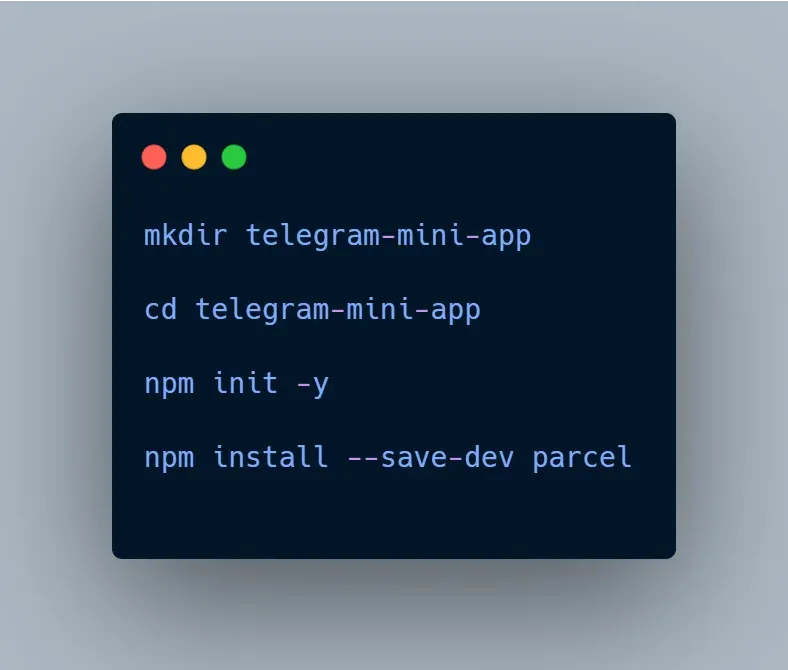
First, create a new project and set up the basic structure:
Creating a successful Telegram Mini App takes more than just coding skills—it requires thoughtful UI design, understanding of user experience, and careful integration with the Telegram platform. By following best practices, you can build a mini app that not only works well but also feels native to the Telegram environment.
Implement secure authentication and handle the token safely
Testing and Debugging
Support features like inline mode mini apps and mini apps launched via the attachment menu mini apps
Ensure you can determine the installation status if needed
Automatically insert the username and manage interactions through your bot
Whether you’re building a utility or a complex solution, the Telegram platform provides the flexibility and power you need. Keep improving, stay informed, and use telegram mini app features to solve real user needs in secure and elegant ways.
Conclusion
Hey there, tech enthusiast! Are you ready to embark on a thrilling journey into the world of Telegram Mini Apps ? Whether you’re a seasoned developer or just getting your feet wet, this guide is your passport to mastering these dynamic applications. We’ll cover everything from setting up the basics to unleashing advanced features, peppered with practical examples and insider tips.
A mini app is a small web application that runs inside Telegram, launched through a Telegram bot. These apps allow users to interact with various services without ever leaving the Telegram app. By leveraging the Bot API and built-in web app support, a mini app provides smooth integration and fast performance.
Apply this inside Telegram
Use the guide to choose a Telegram moment, then connect the campaign or publisher path in AdsGram.