Mini Apps
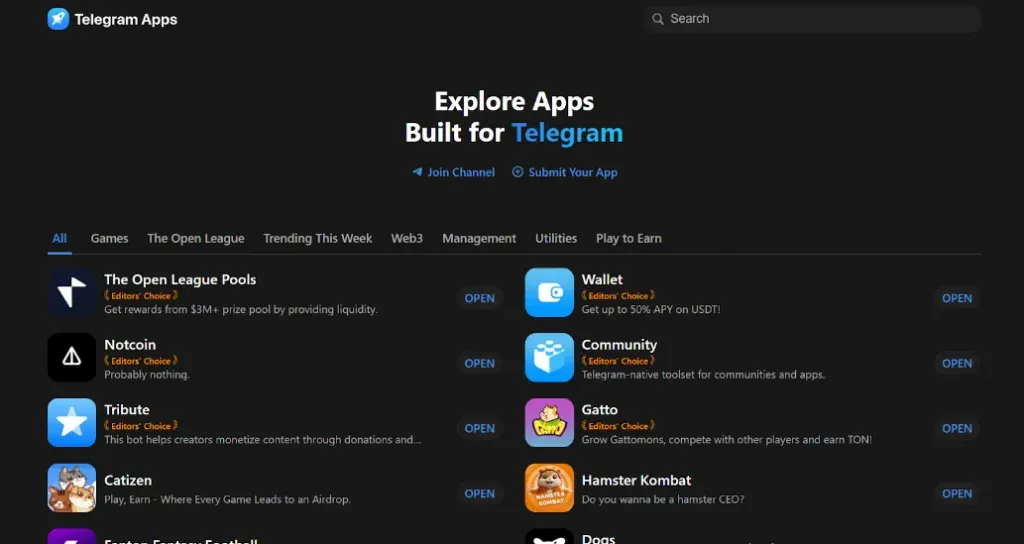
Everything about Telegram Apps Center — the official catalog of Telegram apps
Main point: The Telegram Apps Center is an application catalog within the messenger, developed by the TON Studio team. Here you can find mini-apps, web services, and
Contents
Why Telegram is no longer just a messengerWhat distinguishes mini apps from botsWhat applications can be foundDeveloper opportunitiesExamples of using Telegram Mini Apps in businessHow to add an app to the catalogWhat about TON App — is it an alternative?What’s the outcomeMini App growth works best when the ad moment stays inside Telegram context.
Pair acquisition with tracking and a clear return path.
Use related guides to connect setup, API, and promotion decisions.
Why Telegram is no longer just a messenger
Telegram Apps Center — a catalog of applications within the messenger, developed by the TON Studio team.
In recent years, Telegram has changed significantly. It is now not just an app for communication but also a platform for launching other applications — like an App Store or Google Play, but within the messenger.
Developers are creating mini-apps, web services, and bots for Telegram. To make it easier for users to find them, the Apps Center has been launched — the official catalog of all applications.
Telegram offers two types of applications: mini apps (TMA) and bots. Let's explore the differences:
Support for a web interface within the app (in simple terms — a website inside the app)
What distinguishes mini apps from bots
There is no proper UI, everything is limited to basic buttons and commands in chat.
More complex, requires knowledge of JavaScript and Telegram API
Telegram provides developers with powerful tools for app creation. Let's explore the key features:
Telegram Mini Apps open up a world of opportunities for businesses by providing tools to tackle various tasks. They allow for the creation of digital business cards, organization of online stores with payment system integration, and hosting educational courses with access to personal accounts within the messenger. Such solutions are convenient for small and medium-sized businesses looking to simplify customer interaction.
Gamification and CRM systems are another popular area of application. Interactive mini-apps help engage the audience through giveaways and other activities, increasing subscriber loyalty. At the same time, Telegram can become a task management platform, offering solutions that are beneficial for teams and individual entrepreneurs.
What applications can be found
Additionally, integration with TON blockchain solutions allows for cryptocurrency payments, while the interactive interface of mini-apps boosts conversion rates in the sale of info products.
If you are a developer and want to add your app to the Telegram Apps Center, follow this step-by-step guide:
Create an app according to the official Telegram rules available in the Telegram API documentation . Use the Bot API to build a functional prototype. Test the app on various devices and operating systems. Ensure the app's security by checking for vulnerabilities with third-party tools.
Create an app according to the official Telegram rules available in the Telegram API documentation .
Test the app on various devices and operating systems.
Developer opportunities
Ensure the app's security by checking for vulnerabilities with third-party tools.
Get an access token for your bot or mini app. Set up the main commands and interactions through the Bot API. Fill in the description that will be displayed in the Apps Center.
Set up the main commands and interactions through the Bot API.
Fill in the description that will be displayed in the Apps Center.
Prepare your graphic materials: screenshots, logos, and icons. Write a concise and clear description of the functionality. Place the application in the appropriate category of the catalog.
Examples of using Telegram Mini Apps in business
Prepare your graphic materials: screenshots, logos, and icons.
Write a concise and clear description of the functionality.
Place the application in the appropriate category of the catalog.
Send your application through the official bot @app_moderation_bot. Telegram carefully checks the security, interface, and functionality of the application. If there are any comments, correct them and resubmit your application.
Send your application through the official bot @app_moderation_bot.
How to add an app to the catalog
Telegram carefully checks the security, interface, and functionality of the application.
If there are any comments, correct them and resubmit your application.
After successful verification, your application will appear in the catalog, accessible to millions of Telegram users.
By the way, you can find additional information about TMA at this link .
TON App is a standalone platform for applications on the TON blockchain. It is not directly connected to Telegram.
What about TON App — is it an alternative?
Focus on projects, communities, blogs, and services within the TON ecosystem
In reality, many developers publish apps on both platforms, but the primary one is considered Apps Center.
Telegram Apps Center is a convenient way to find useful applications right within the messenger. Users can instantly launch apps in the adjacent tab, without the need to navigate to a website or open a bot via links.
The catalog is constantly updated: new games, work services, and financial tools are emerging.
All applications undergo security checks — you don’t have to worry about scammers.
What’s the outcome
If you're a developer, now is a great time to publish your app: the audience is growing, and competition is still low.
TON App can be an interesting alternative for driving traffic to your TMA, but for regular users, the Apps Center is more convenient. The Telegram Apps Center allows users to instantly launch apps in a neighboring tab, without the need to navigate to a website or open a bot through links.
Apply this inside Telegram
Use the guide to choose a Telegram moment, then connect the campaign or publisher path in AdsGram.