Mini Apps
Telegram Mini Apps: what are they
Telegram Mini Apps — what they are and why they are needed. Discover how mini-apps work in Telegram and how they benefit businesses and users.
Contents
What are Telegram mini-appsPros and cons of Telegram Mini AppsKey stages of creating mini apps in TelegramDevelopment tools for creating Telegram Mini AppsHow to monetize a Mini AppProspects of Telegram Mini AppsConclusionMini App growth works best when the ad moment stays inside Telegram context.
Pair acquisition with tracking and a clear return path.
Use related guides to connect setup, API, and promotion decisions.
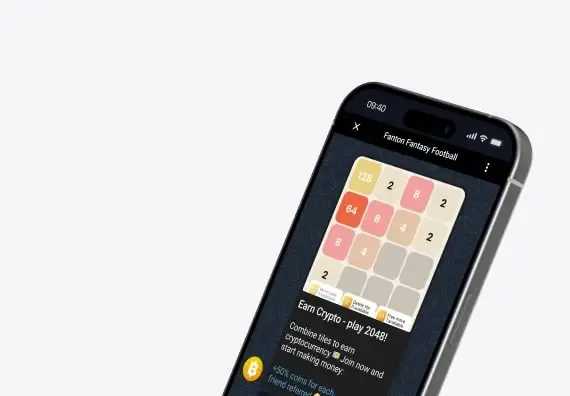
What are Telegram mini-apps
Telegram Mini Apps — are compact web applications that function right inside Telegram. They provide the opportunity to create interactive services without leaving your favorite messenger.
Imagine that everything — from buying tickets to playing games — is available in just a couple of clicks, without downloading unnecessary apps.
In this article, we'll explore what Mini Apps are, why they are amazing, how to create them, and what the future holds for this format.
Mini Apps in Telegram are something between chat-bots and full-fledged applications. They allow users to accomplish tasks directly in the messenger: ordering food, playing games, signing up for courses, or paying for services. All of this happens quickly and conveniently.
They use the Telegram interface, which is already familiar and does not require learning new applications.
Easily launched via buttons, commands, or links, simplifying interaction.
Support the execution of everyday tasks without the need to switch to other apps.
Integration with the powerful Telegram API: OAuth authorization, built-in payments, notifications.
Pros and cons of Telegram Mini Apps
A ready-made platform for creating interactive solutions that reduce infrastructure costs.
• Ideal for quickly testing new ideas and ways to monetize your Mini App with access to a wide Telegram audience.
Everything in one place: the user doesn’t need to jump between applications. For example, a mini app can allow selecting and paying for products or services directly in the chat.
Integration with powerful Telegram tools: these apps utilize built-in payments, notifications, and authorization via Telegram ID.
Quick launch and testing of new ideas: thanks to minimal development costs, you can quickly validate demand for new solutions.
Functionality is limited to the messenger's framework: complex features such as 3D animation or deep analytics can be difficult to implement.
Dependency on Telegram API updates: if Telegram changes the API structure, it may temporarily disrupt the app's functionality.
Mini Apps require a good internet connection: A stable connection is essential for real-time operations, which can be a challenge in regions with low network quality.
Key stages of creating mini apps in Telegram
Let's approach the topic conceptually and review the main stages of developing mini apps — interactive mini-applications embedded in Telegram.
Needs analysis. Identify what tasks your mini-services in Telegram should solve: do you need authorization, order placement, notification sending, or account management? Mini apps in Telegram are often used for online appointments, reservations, surveys, and sales. Analyze existing Telegram applications to identify weaknesses and offer a better experience.
Technical specifications (TS). Formulate a precise TS for your telegram mini app. Specify which Telegram APIs you plan to use, how interaction with the bot will occur, and what user scenarios you will implement. A good TS allows you to accurately define the functional boundaries of your Telegram application and simplify its implementation.
Interface prototype (UX). Before development, it is important to create a clickable prototype of the future mini-application for Telegram. Use Figma or similar tools. Conduct user testing to find out how convenient it is to use your mini-service in Telegram on mobile devices. A user-friendly UX is a key factor for the success of mini apps for Telegram.
Creating the interface (UI). The UI should be lightweight, intuitive, and adaptive. Choose modern frameworks like React.js or Vue.js. They are well-suited for building interfaces for mini apps in Telegram, especially if the application needs to work on different screens. Mini services in Telegram are often opened on mobile devices, so the design should be mobile-first.
Backend. Any mini app for Telegram requires a reliable server architecture. Host the server on platforms like AWS or Google Cloud. Use REST or GraphQL APIs for data exchange between the client side and the server. A well-thought-out architecture will allow your Telegram application to scale without losing stability.
Integration with Telegram API. Utilize the Telegram Bot API and Web Apps SDK to implement Mini Apps functionality for Telegram: buttons, forms, notifications, inline mode, and much more. Telegram provides everything you need to create a fully functional Mini App for Telegram that operates within the messenger’s ecosystem.
Security. Any Mini App for Telegram must operate over HTTPS. Install SSL certificates, use encryption, and store keys and access tokens securely. It’s especially crucial to ensure security if your Telegram app handles payments or personal data.
Development tools for creating Telegram Mini Apps
Tools and automation. Integrate analytics systems (Google Analytics, Amplitude) into your Mini App for Telegram to track user behavior. Platforms like Directual can also be used to automate business logic. Modern Mini Services on Telegram need to be not only functional but also 'smart' – adapting to user actions.
Testing and launch. Conduct alpha testing with a loyal audience to gather feedback on how the Mini App for Telegram performs. After fixing bugs, execute a full release. Share the link to your Telegram app in your channel, and add a description of features and usage instructions.
Monitoring and analytics. Use Prometheus, New Relic, or similar services to monitor the state of your Mini App for Telegram. Ensure that the Mini Services on Telegram operate smoothly, respond quickly to user actions, and do not experience failures during peak hours.
Updates and improvements. Collect feedback, analyze what users expect from your Mini App for Telegram, and regularly update it. Mini Apps for Telegram are living products that should evolve alongside the audience.
Feedback. Add a feedback form within the Mini App for Telegram or connect a chatbot for support. The faster you respond to user inquiries, the higher the loyalty to your Telegram app.
Creating Mini Apps for Telegram is a step-by-step process that includes preparation, interface design, development, testing, and support. A successful Telegram app should be simple, secure, and useful. With Telegram Web Apps (see our web apps guide ), you can create a complete Mini Service in Telegram that operates in the familiar interface of the messenger – without the need to install separate programs.
React.js : Popular for its component architecture and large developer community. Ideal for building complex user interfaces.
Vue.js : Lightweight and flexible, perfect for small to medium projects with simple UIs.
How to monetize a Mini App
Angular : Used for building scalable applications with robust built-in capabilities, including state management and modularity.
Postman : Convenient for testing API requests and working with RESTful services like the Telegram Bot API.
Selenium : Used for automated testing of web interfaces, which is essential for validating the functionality of Mini Apps.
Telegram Bot API : Provides access to the core functions of the messenger, including message handling, commands, and user interaction.
Telegram Web Apps SDK : Designed for developing web applications that integrate into Telegram, allowing the use of built-in features like payments and authorization.
Monetizing Telegram Mini Apps opens up a wealth of opportunities for developers. Let's explore the main approaches:
Subscription or one-time access : You can offer users the option to pay for your application either monthly or as a one-time fee. For example, this could be access to premium content, unique features, or educational materials. Monthly plans create a stable revenue stream and allow you to develop the app based on user feedback.
Paid Features : Provide basic functionality for free, while making additional options paid. This could include advanced analytics, personalized notifications, or customization options for the interface. This approach is particularly appealing for apps where users are willing to pay for convenience and added value.
Prospects of Telegram Mini Apps
Advertising : If your app has gained a large audience, integrate unobtrusive ad blocks. These could be ads from partner services or promotional offers related to your app's topic. The key is to maintain a balance so that advertising does not interfere with the user experience.
Partnerships : Collaborate with other services to create mutually beneficial integrations. For example, you can provide access to specific features through partner APIs or share profits from services ordered through your app. This not only generates income but also expands your audience.
Telegram continues to actively enhance the capabilities for mini-apps. Recent updates include:
Launch Mini Apps in fullscreen mode in both portrait and landscape orientations
Share media files and upload them through built-in dialogs
Use the user's location data for interactive services
Utilize accelerometer, gyroscope, and orientation data to create AR/VR applications
Create paid subscriptions with various access levels
Conclusion
Set up the loading screen with your own colors and icons
Get device performance information to optimize user experience
These improvements make Telegram Mini Apps more functional and user-friendly for both users and developers, expanding the range of possible applications and use cases.
Telegram Mini Apps represent a revolutionary approach to creating interactive services within messenger platforms. They open up vast opportunities for businesses, enabling the development of convenient and functional solutions without the need for separate app installations. With features like fullscreen mode, home screen shortcuts, and integration with emoji statuses, users enjoy a unique experience, while developers gain powerful tools to bring their ideas to life.
With each update, Telegram Mini Apps become more versatile and accessible. Integration with geolocation, support for device movements, and monetization options make them an ideal tool for startups, game developers, and large corporations.
If you're looking for a way to simplify client interactions or implement innovative solutions — and want to compare Mini Apps vs analogues on other platforms — creating mini-apps in Telegram is your next step.
Apply this inside Telegram
Use the guide to choose a Telegram moment, then connect the campaign or publisher path in AdsGram.